Documentation
Help & Handbook
Anyone running a server in their own house wants to know what they are getting into. That is why everything is out in the open — no account, no registration.
Welcome to the central AnnexGroup help. These documents apply to users, administrators and developers alike, and are updated with every release.
Getting started
- Installation
- First steps after installation
- Dashboard and monitoring
- Mailboxes and folders
- Calendar and iMIP
- Contacts, calendars and tasks
Administration
- Managing users and domains
- Setup assistant (admin wizard)
- Security settings
- Backups and restore
- Exchange migration
- Archiving and GDPR
- Transport rules
- Compliance and eDiscovery
- Licence management
For developers
Missing a topic? Report it from the admin page or through your usual contact.
Quick start
Calendar and iMIP
AnnexGroup offers multiple calendars per user. Appointments can be managed via CalDAV or the web interface. Creating, renaming and deleting calendars On the cal…
Contacts, calendars and tasks
Beyond email, AnnexGroup provides central management for contacts, appointments and tasks. Contacts Enter manually or import from vCard. Export all contacts as …
Dashboard and monitoring
The dashboard shows the state of the server and of your communication at a glance. Widgets CPU / memory / disk: utilisation as gauge and sparkline. Queue: pendi…
First steps
After installing AnnexGroup, you set up the first domain and the admin account through the setup assistant. Step 1: Initial configuration Open https://<your-…
Installation
This page takes you from the downloaded file to a running service. After that, continue with First steps. Allow about half an hour if your database and DNS are …
Administration
Archiving and GDPR
AnnexGroup provides the technical functions for GDPR-compliant data processing. Archiving Automatic archiving once retention periods elapse Movement into the se…
Backups and restore
Under Administration → Backup you create and manage backups. What is included? MySQL/MariaDB database Blob storage (attachments and message bodies) Server set…
Compliance and eDiscovery
AnnexGroup provides server-side compliance functions for everyday administration: litigation holds, eDiscovery search, journaling and DLP templates. Litigation …
Exchange migration
The AnnexGroup server takes over data from Microsoft Exchange and Outlook by itself — normally in a single pass, with no Mac in between. AnnexOffice on a Mac …
Licence management
AnnexGroup uses a local licence management without phone-home. The licence is stored on the server and validated with an Ed25519 public key. Trial licence On fi…
Managing users and domains
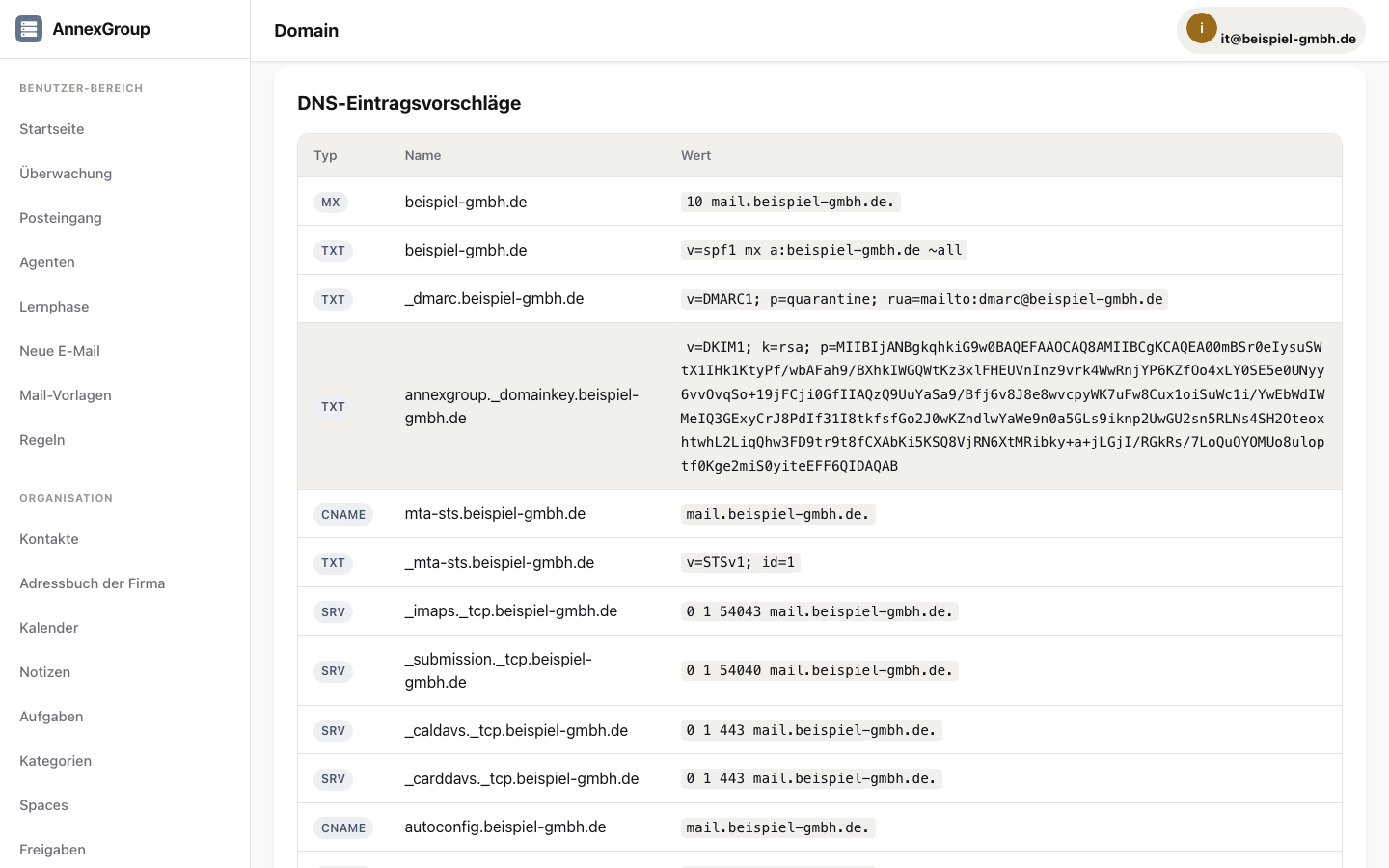
Administration is reached at /admin. Domains Every domain needs: A valid MX record An SPF record A DKIM key (generated inside AnnexGroup) A DMARC policy User ro…
Security settings
Under Administration → Security you configure the server's security profile. Security presets Balanced: balanced settings for production operation. Strict: sh…
Setup assistant (admin wizard)
The admin wizard at /admin/wizard walks you through recurring setup tasks step by step. It is particularly useful right after installation, when no domain has b…
Transport rules
Transport rules let administrators modify incoming and outgoing mail on the server, before it is delivered or placed in the queue. When they apply Rules take ef…
For developers
API and OAuth overview
AnnexGroup exposes a REST API under /api/v1/. Authentication Session cookie: for requests from the web UI OAuth 2.0: for third-party applications API tokens / a…
The AnnexTalk protocol
AnnexTalk is the open wire protocol for agents, spaces and real-time communication in AnnexGroup. Endpoints Base URL: /api/v1/annextalk Authentication: cookie o…
Where to begin
You want to try it
First steps → Admin wizard. Allow one to two hours, most of it waiting for DNS.
You want to replace Exchange
First what AnnexGroup covers and what not, then the migration. In that order — it may save you the installation.
It is running and stuck
Monitoring and Security cover the common cases. If the web interface is no longer reachable, annexgroup restore-backup restores a backup — proven for the same machine and the same database, and on a different machine with an empty database; the counts matched. If nothing helps: write to us.
Something missing or described wrong? Tell us. Your question shows us where the text falls short — and that is the only reliable way to find out.