Migration
Exchange is running out.
What has to be decided now.
Exchange Server 2016 and 2019 have had no regular support since 14 October 2025; from October 2026 Microsoft starts disabling EWS in Exchange Online. A sober assessment for everyone who runs a groupware server themselves or maintains one for customers — with dates, consequences and an honest statement of what AnnexGroup replaces and what it does not.
The dates
| What | When | What follows |
|---|---|---|
| Exchange Server 2016 and 2019 | 2025-10-14 | Support ended; Microsoft offers paid, time-limited Extended Security Updates. The successor Exchange SE is a subscription; Microsoft raised prices by 10 % for servers and 15–20 % for access licences (source: Practical 365). |
| Kopano Groupware and Core | 2024 | According to Kopano, the older Kopano Groupware reached end of life in 2024; Kopano names “Kopano Cloud” as the successor product. Other sources give 31 March 2025 as the end of support; we could not confirm that on Kopano’s own site. |
| Zimbra 9.0.0 | 2025-06-30 | According to the Zimbra wiki, technical guidance (“End of Technical Guidance”) for Zimbra 9.0.0 ends on 30 June 2025. |
| EWS in Exchange Online | from October 2026, fully April 2027 | Microsoft is switching off Exchange Web Services. The successor, Microsoft Graph, exists exclusively in the cloud — there is no replacement for self-hosting. Integrations that run over EWS today have to be rebuilt. |
The last point is often overlooked. It affects not only those still on-premise, but every application that accesses mailboxes via EWS — archiving, signature management, fax gateways, CRM integrations, backup solutions. Whoever checks this only in autumn 2026 will have little time.
The three paths
Into the cloud
Microsoft 365 or Google Workspace. The least work, permanently the highest cost — $14 per user and month, with a documented tendency to increase. Plus the question of where the data lives and who can access it in doubt.
Exchange SE
Technically almost unchanged from 2019, but as a subscription. Familiar administration, familiar tools — and running costs where a perpetual licence used to be.
Switch within self-hosting
A different server in your own house. Requires a one-time migration effort, then control over cost, data and schedule. This is where AnnexGroup stands.
We do not claim the third path is right for everyone. If you want to move to the cloud anyway, you are better off there. AnnexGroup gets interesting when you want or need to stay self-hosted — for cost reasons, because of where the data sits, or because your customers want it that way.
What AnnexGroup covers — and what it does not
This table is the reason this page exists. It is meant to take the assessment off your plate of whether a test is even worth your time.
| Familiar from Exchange | In AnnexGroup |
|---|---|
| Mail via SMTP and IMAP | Yes, built in, with STARTTLS and DKIM signing |
| Calendar with invitations | Yes, iMIP for sending and receiving |
| Contacts | Yes, with vCard import and export |
| Tasks and notes | Yes |
| Public folders | Taken over as public folders with the same nesting; calendar and contact folders become shared spaces |
| Sharing and delegation | Yes, including send as and send on behalf |
| Web interface like Outlook Web | Yes, also installable as a web app |
| iPhone and Mac integration | Yes, via CalDAV and CardDAV |
| Out-of-office reply, rules | Yes, both — out-of-office reply and server-side rules |
| Spam and virus checking | Via Rspamd and ClamAV integration |
| MAPI / full Outlook integration | No. Classic Outlook gets mail over IMAP. For calendars and contacts, Outlook has no built-in path to open standards — they run via the Outlook CalDav Synchronizer add-on (third-party software under AGPL, without support from us). |
| EWS | As a server protocol: no — instead, its own REST API with OAuth2. As a source for the migration: yes, fully — the server itself reads calendars, contacts, tasks and notes via EWS. |
| Multi-tenancy | Yes — dedicated tenant role (domain admin), in the web interface and through the API. Anything affecting the whole installation stays with the operator. |
| Automatic import of existing mailboxes | Yes, entirely in the server: mailboxes through the wizard, calendars, contacts and tasks in the same run via EWS or Microsoft Graph. No Mac needed. The Graph path is covered by tests — not tried against a real Exchange Online mailbox. |
In short: If you need Outlook with full Exchange integration, AnnexGroup is the wrong choice. If you use mail, calendar, contacts and shared filing over standard protocols — and that is most smaller environments — you will find everything here again.
Included in the shipped build
The Exchange habits worth keeping
People leaving Exchange ask about the small things first: can a colleague see when I am free? Will I get the meeting room? Can I write to the whole department? Those paths are built and covered by tests.
Free/busy
When is a colleague available — visible in your own calendar app, without anyone giving away what the appointment is. Only time goes out: no title, no location, no attendees.
Rooms and equipment
A meeting room has its own calendar and answers for itself: accept when free, decline when booked — naming the conflicting appointment as the reason.
Global address list
Colleagues are findable on a freshly set up device, without anyone entering contacts by hand. Limited to your own domain.
Distribution groups
One address for the whole department, nested as deeply as you like. Anyone in two subgroups still receives the mail exactly once.
Send as, send on behalf
An assistant writes from the management mailbox — either visibly on their behalf, or entirely in the name of the mailbox.
Out of office with a period
A start and an end instead of a switch you forget on the day you return. Separate texts for inside and outside, because your stand-in's extension does not belong out there.
Rules on the server
File, forward, reply, discard — even when no mail program is running.
Take public folders along
The folder structure from Exchange is mapped onto shared spaces and mailboxes. The mapping is settled before the move and can be changed.
What this means, and what it does not. These features are in the build you download today and covered by automated tests. What AnnexGroup deliberately cannot do is stated openly in the comparison table.
A migration in 5 steps
- Set up in parallel. Install AnnexGroup on a separate machine, with a test domain. The existing server keeps running unchanged.
- Create the structure. Domains and users via the setup wizard or the command line.
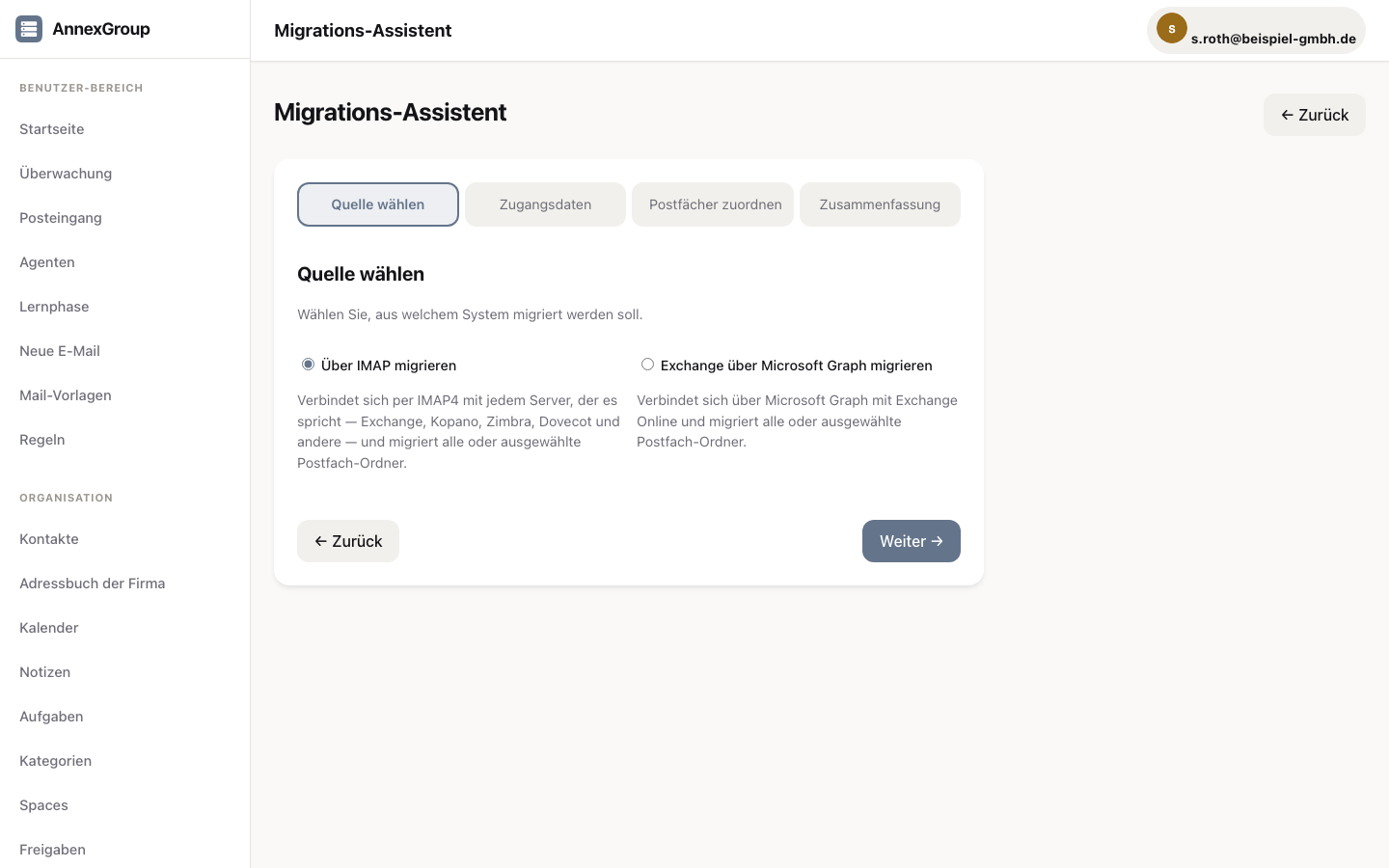
- Copy data. The server itself takes over the mailboxes through the migration wizard at
/access/import/wizard— over IMAP from any server that speaks it (Exchange, Kopano, Zimbra, Dovecot and others) or via Microsoft Graph. PST/OST files go through the import page/access/import. Calendars, contacts and tasks are taken over by the server as well — via EWS or Microsoft Graph, in the same run; notes only via EWS. The Graph path is covered by tests — we have not tried it against a real Exchange Online mailbox. The migration does not need a Mac. Migrating directly from a workstation with AnnexOffice is planned, but its integration with AnnexGroup is not finished — the proven path runs through the wizard on the server. A second run does not create duplicates, because every object carries its identifier from the source system; every run writes a log of transferred, skipped and failed items. Notes are only brought in from Exchange on your own premises. - Test with a handful of people. Two weeks of real operation say more than any feature list.
- Switch over. Change the MX record. The old server stays as a way back until you are sure.
The 14-day trial period is sized so that steps 1 to 4 fit into it. If it is not enough, write to us — we extend it.
The workplace afterwards
AnnexOffice is the Mac app for mail, calendar, contacts, tasks and notes in one interface — a product from AnnexCREATE.
Every server licence includes AnnexOffice seats: 5 with Small, 10 with Standard, 15 with Medium, 25 with Large and 50 with Very large. The number is stored in the price list and lasts as long as the licence. AnnexOffice is also available without a server licence: in the Office bundle or Complete bundle from AnnexCREATE — or free in the beta.
Anyone who wants to stay with Outlook, Thunderbird or another standard client can do so: AnnexGroup speaks IMAP, SMTP, CalDAV and CardDAV. The integration of AnnexOffice with AnnexGroup is not finished — until then, the seats booked with a server licence work with the web interface or a standard client.
For IT service providers
If you maintain several customer environments: every installation needs its own licence, tiered by user count. And that one installation can serve several of your customers — each tenant with its own “domain admin” role. What the role covers, and where its limits are, is set out below.
What the domain admin can do
- Create and manage users, distribution groups, rooms and equipment, aliases and shared mailboxes of their own domain
- View and maintain their own domain including subdomains — creating and deleting domains stays with the operator
- The individual object is checked too: access to another tenant’s data ends in 403, not in data
- Full-text search, address book, sharing and free/busy stop at the domain boundary
- The licence counts users across all tenants — the admin console shows “X / Y” and refuses to create users before the quota breaks
Limits that belong with it
- Anything affecting the whole installation stays with the operator: settings, security, licence, backup, deliverability, transport rules, checklists and access tokens
- DKIM, DNS records and public folders are reserved for the operator
- Of the compliance features, retention holds and DLP rules of their domain belong to the tenant; eDiscovery and journal rules stay with the operator because both reach beyond the boundary
From the second licence onwards we grant a 25 % discount — the same terms as on the pricing page, no conversation required. If you support considerably more environments, a conversation is still worth it: write to us and we will make you an offer.